
Release No.: 1.6.1.4| Release Date: 08/08/2026
Dear Users,
On 8th August 2026, a release was successfully deployed. The key improvements included in this release are outlined below:
- Two-Factor Authentication (2FA) – Added support for 2FA to provide an extra layer of security for user accounts. For more details, please refer to the Knowledge Base article: Two-Factor Authentication
- UBL Improvements
- UBL Field Standardization – The following UBL fields are now automatically standardized to uppercase:
- Currency Code; IBAN; BIC; Tax Scheme ID; Postal Zone; VAT Number; KVK / Company ID; Tax Category ID
- Due Date & Delivery Date Extraction – Added support for extracting Due Date and Delivery Date for UBLs.
- Due Date: Extracted at the header level.
- Delivery Date: Can be extracted at both the header and line levels.
- UBL Field Standardization – The following UBL fields are now automatically standardized to uppercase:
Note – This feature is disabled by default and can be enabled upon request.
If you have any questions or need any assistance, please feel free to contact us.
Warm regards,
Team SmartUBL.
Release no.: 1.6.1.1 | Release date: 13/05/2026
Dear Users,
As of 13th May. enhancements have been added to File Name handling.
What’s changed:
- Unsupported special character and Unicode character will now be automatically removed from Original File name and UBL File name.
- The following characters are not supported and will be removed
:,/,*,?,\,<,>,|,",#,\u200B,\u200C,\u200D,\uFEF - A maximum File name length limit of 150 characters has been introduced for all File names.
Note-Spaces in File name will remain unchanged for both Original File name and UBL File name.
Please contact the support team for any questions.
Kind Regards,
Team SmartUBL.
Release no.: 1.6.1 | Release date: 09/05/2026
Dear Users,
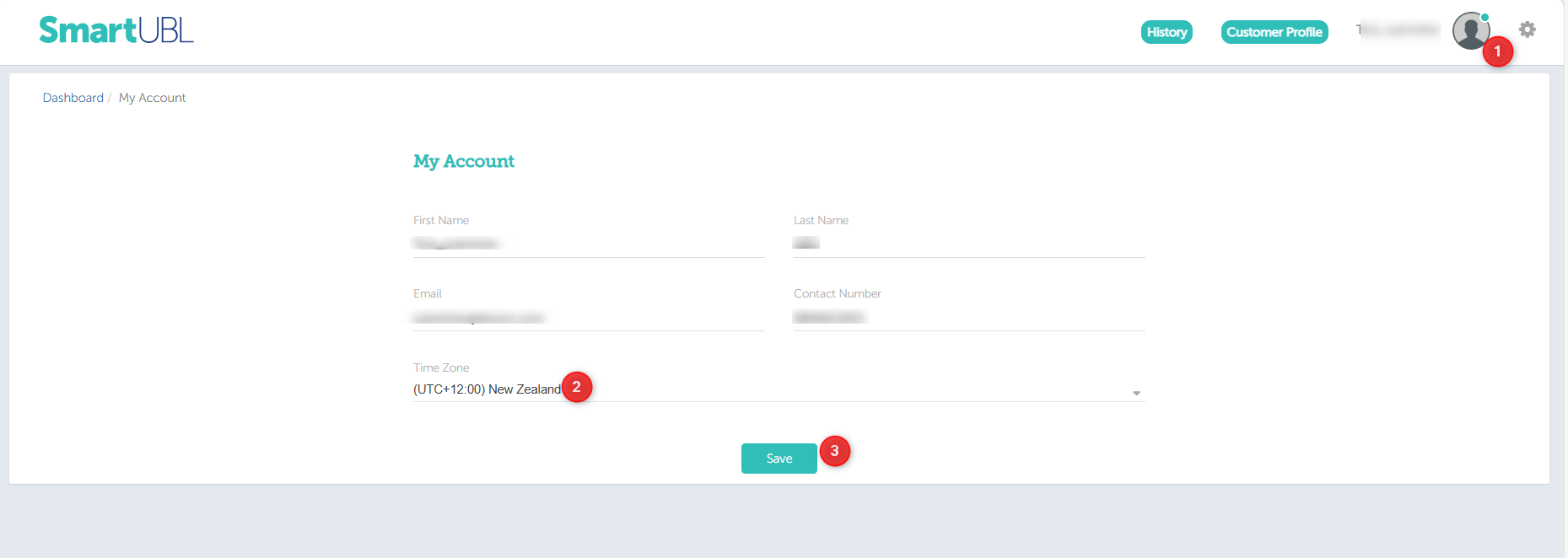
As of 9th May, we have launched a new Timezone selection feature allowing users to configure their preferred local time in SmartUBL.
How to configure your timezone:
- Click on “My Account” from your Profile picture in the SmartUBL web application.
- Select your preferred timezone from the drop-down list.
- Click “Save” to apply the changes.
For non-portal users:
Please contact the support team to configure your timezone.
Note-The feature will support Daylight Saving Time (DST) when applicable.
Kind Regards,
Team SmartUBL.
Release no.: 1.6.0 | Release date: 14/04/2026
As of April 14, 2026, we’ve launched a new Forgot Password feature — so you’re never locked out again.
Here’s how it works:
- Click on “Forgot Password” on the login page
- Enter your registered email address
- Check your email for a reset link
- Create a new password and log in again
A few things to know:
- The reset link is secure and will expire after 24 hours.
- For your safety, you won’t be able to reuse your last two passwords.
This update is all about making your experience smoother and more secure. Please contact our support team for any queries.
Team SmartUBL.
Release no.: 1.5.9 | Release date: 21/03/2026
Dear Users,
We have released a new update to SmartUBL on 21st March, introducing “File Size Visibility” in API.
The parameters provided in the API:
-
InvoicesCount – Number of invoices
-
DocumentPdfSize – Size of the processed document
- SourceFileSize (KB) – Size of the original uploaded document
These enhancements are now live and ready to use, with no action required from your side. For detailed information on these updates, please refer to the API documentation available here: Documents
If you have any questions or need assistance, please feel free to reach out.
Kind Regards,
Team SmartUBL.
Release no.: 1.5.6 | Release date: 27/01/2026
Dear Users,
We will be releasing a new update to SmartUBL on 27th January, introducing File Name Settings for downloaded files.
This enhancement allows you to control how file names are generated when downloading documents.
- Setting 1-Existing settings (Default):
Downloaded files will continue to follow the current file-naming behavior. - Setting 2- Unified Original File name :
Downloaded files will use the original file name as received. - Setting 3- InvoiceNumber_SupplierName :
Downloaded files will be named in the format “InvoiceNumber_SupplierName”.
Note:
If any required value (Invoice Number or Supplier Name) is missing, the system will automatically fall back to Setting 2 (Unified Original File Name) for that file.
To avoid any disruption of existing workflow, Setting 1 will remain enabled by default after the release.
If you would like to change this configurations , please contact our support team.
Kind Regards,
Team SmartUBL.
Release no.: 1.5.5 | Release date: 12/01/2026
Dear Users,
We released a new update on 12th January introducing a Missing Invoice Number Enrichment setting in SmartUBL.
You can now choose whether SmartUBL should automatically generate an invoice number when it is missing.
- Setting ON (Default):
If an invoice arrives without an invoice number, the system generates one using the invoice date. - Setting OFF:
If an invoice arrives without an invoice number, it remains blank.
To avoid any disruption, this setting has been enabled (ON) by default.
If you would like to disable it, please contact our support team.
Kind Regards,
Team SmartUBL.
Dear user,
We hope you are doing well.
We are pleased to announce that SmartUBL now delivers a more detailed and structured UBL format, further enhancing the quality and completeness of your generated UBLs.
This message serves as a reminder to our previously shared intimation on these enhancements which will be released and applied on 15th December 2025.
Key improvements include:
- Postal Address Updates: StreetName has been split into CityName and PostalZone. BuildingNumber is a newly added field.
Updated tag:
<cac:PostalAddress>
<cbc:StreetName>Desk</cbc:StreetName>
<cbc:BuildingNumber>1</cbc:BuildingNumber>
<cbc:CityName>Stockholm</cbc:CityName>
<cbc:PostalZone>83873</cbc:PostalZone>
<cac:Country>
<cbc:IdentificationCode listAgencyID=”6″ listID=”ISO3166-1:Alpha2″>SE</cbc:IdentificationCode>
</cac:Country>
</cac:PostalAddress>
- Order Reference: No structural changes to <OrderReference>. It will now be included as a default value for all clients.
Tag:
<cac:OrderReference>
<cbc:ID>M011111</cbc:ID>
</cac:OrderReference>
- Extra Article Line Description: The article line description will now also be exported in the <Name> tag in addition to <Description>.
Tag:
<cbc:Description>stocks</cbc:Description>
<cbc:Name>stocks</cbc:Name>
- Customer & Supplier – COC/Organisation Number: A new field has been added for customers. The COC/Organization Number will now appear in both:
Tags:
<cac:PartyIdentification>
<cbc:ID schemeAgencyID=”ZZZ” schemeID=”SE:VAT”>1234567891</cbc:ID>
</cac:PartyIdentification>
AND
<cac:PartyLegalEntity>
<cbc:RegistrationName>SSSSSSSS</cbc:RegistrationName>
<cbc:CompanyID schemeAgencyID=”ZZZ” schemeID=”SE:VAT”>1234567891</cbc:CompanyID>
</cac:PartyLegalEntity>
- Supplier Email: Supplier email is now included under the <Contact> tag.
Tag:
<cac:Contact>
<cbc:ElectronicMail>test@ubl.com</cbc:ElectronicMail>
</cac:Contact>
- Customer Email: Customer email is now included under the <Contact> tag.
Tag:
<cac:Contact>
<cbc:Telephone/>
<cbc:ElectronicMail>sa.wy@test.com</cbc:ElectronicMail>
</cac:Contact>
Starting 15 December, this new SmartUBL Version 2 (V2) format will become the default for all SmartUBL conversions. We have already tested V2 with your current account settings and can confirm that all your existing fields and values will continue to be delivered as before, now complemented by the additional details introduced in V2.
The previous UBL version (referred to as Version 1) will be phased out, and all clients will be transitioned to V2.
In addition, the following enhancements are already present in SmartUBL V2:
- Customer Profile Feature – A configured customer profile (with KvK, VAT, etc.) can now be automatically applied to each converted UBL per account.
- Improved Validation Checks – Detection of duplicate and incomplete invoices.
There is no additional cost associated with this update. Your pricing remains unchanged. This upgrade reflects our commitment to continuously improving SmartUBL and providing you with maximum value.
If you have any questions or need assistance, please feel free to reach out.
Warm regards,
Team SmartUBL.