
You now have greater control over administration management in Smartbooqing! Users can activate or deactivate specific administrations directly from the administration list.
How It Works:
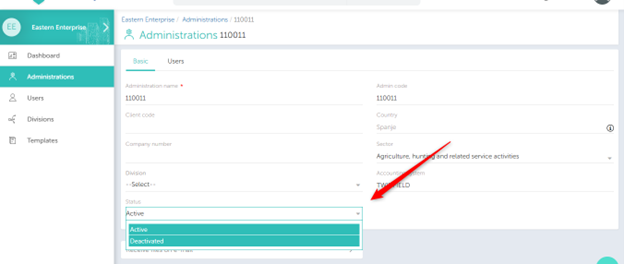
When you open an administration from the Administration List, you’ll notice a new field labeled Status has been added to the page.
From here, you can set the status to either:
- Active – Enables full processing and export capabilities for the administration.
- Deactivated – Pauses all processing and exports for that administration.
Access Permissions:
Only users with the following roles can change the status:
- Admin
- Team Lead
- User+
Note –
- Even when deactivated, the administration will still appear in system lists. It will remain assigned to users and visible in templates or divisions it’s associated with.
- Changing the status does not delete or alter any existing settings for the administration.